Group projects,
without the group pain.
A shared workspace to organize assignments, track deadlines, and actually know who's doing what — so you can stop juggling WhatsApp, Google Docs, and guesswork.
Is Magnifi good for student projects?
Yes. Magnifi is a free project management tool built for students and group assignments. It gives your team one shared workspace to assign tasks, track deadlines on a timeline, and see who's doing what — replacing scattered WhatsApp chats and Google Docs. It's free for teams up to five and sets up in under two minutes, with no learning curve.
Last updated June 2026
Sound familiar?
Every group project
starts the same way.
The WhatsApp spiral
Important decisions buried under 200 unread messages. Links lost. Files gone. Nobody knows who's doing what.
The deadline panic
It's 11 PM. The presentation is tomorrow. Three people worked on the same section. Nobody touched the bibliography.
The ghost teammate
One person vanishes for two weeks. Comes back the night before submission asking 'what do I do?' — with no context.
Magnifi fixes this.
One workspace. Real-time visibility. Everyone on the same page — literally.
One board per project
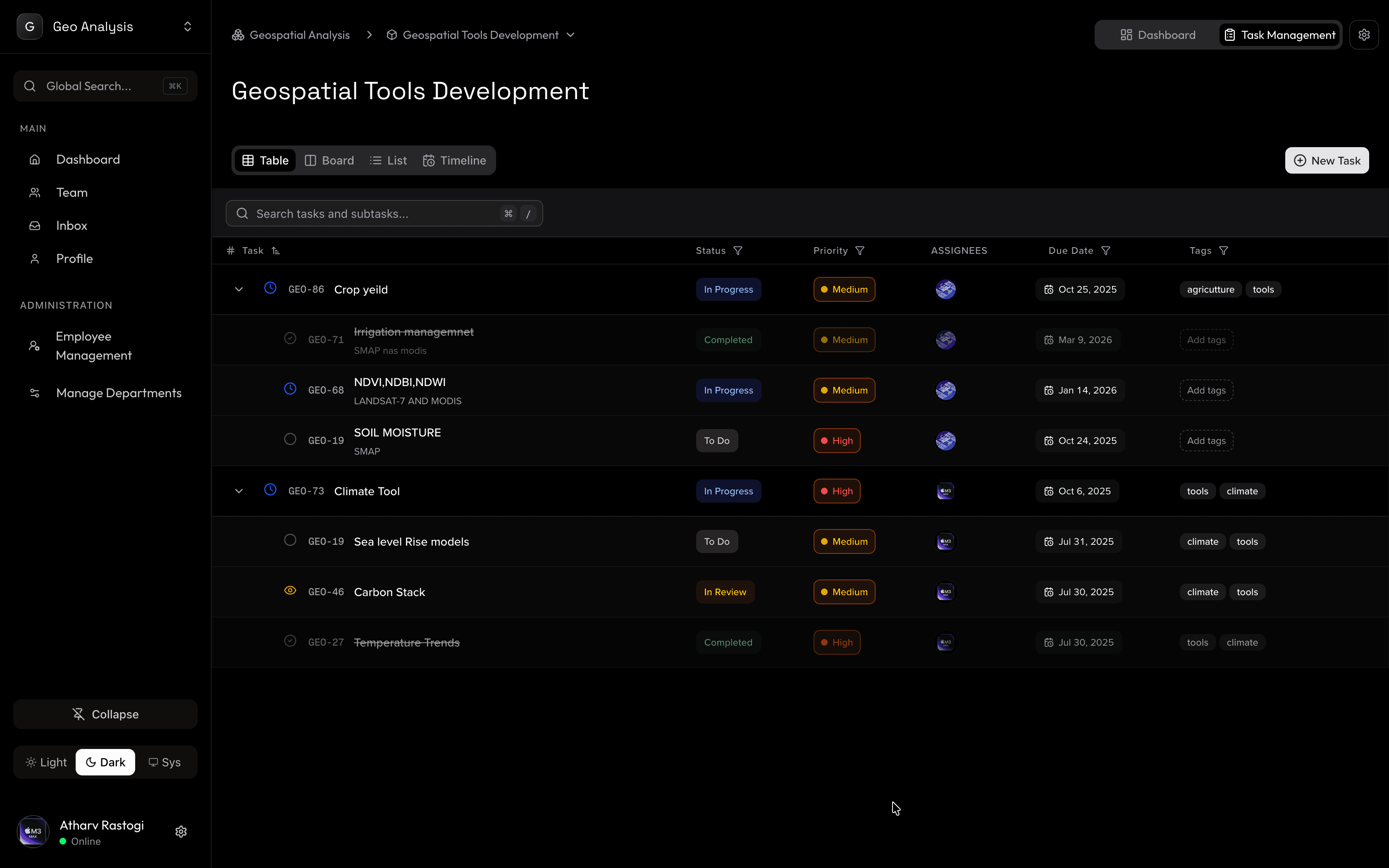
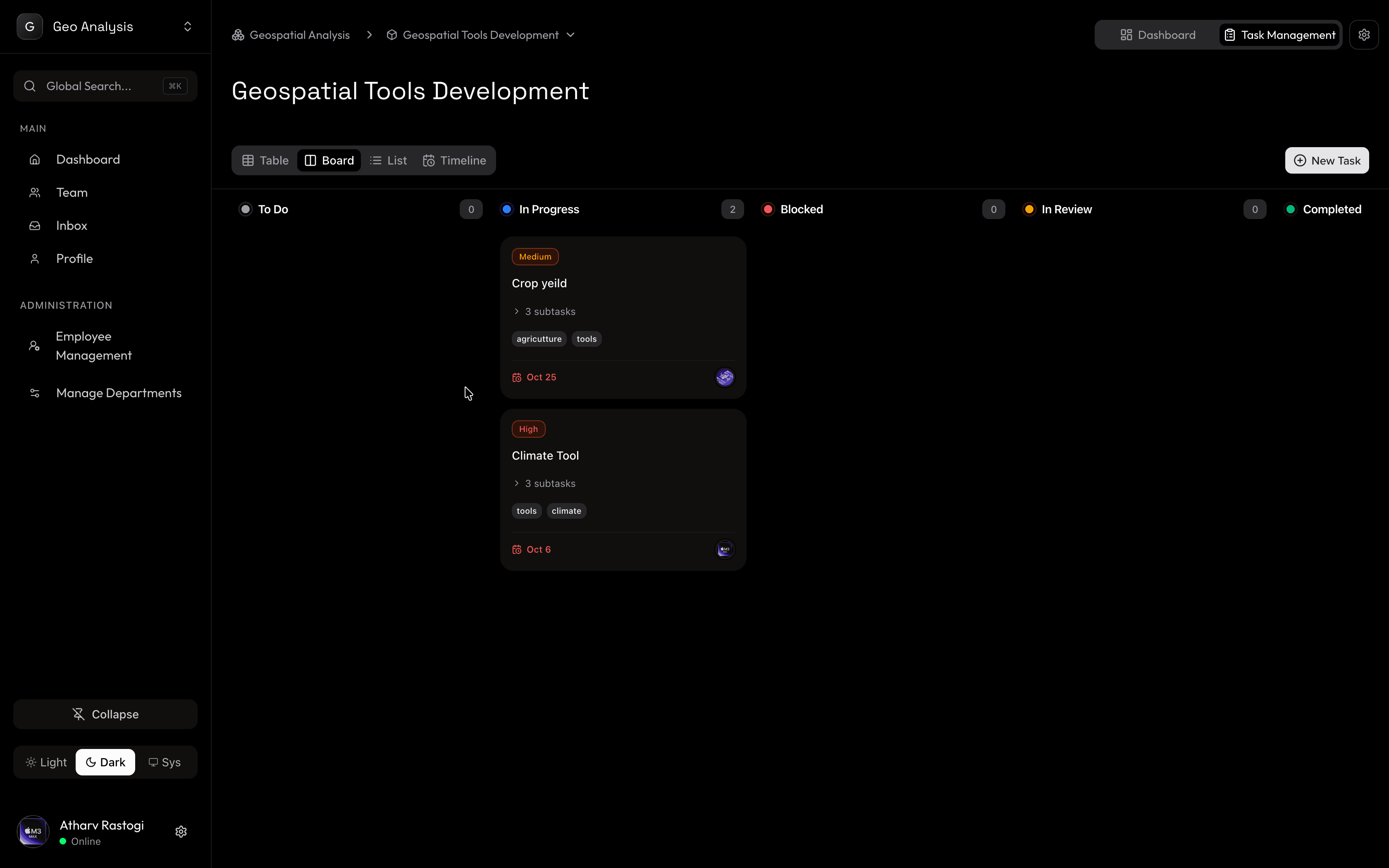
Create a board for each assignment. Drag tasks through To-Do, In Progress, Review, and Done. Everyone sees the same truth.
Teams that mirror your group
Invite teammates in seconds. Assign tasks with one click. No more guessing who's responsible for what.
Deadlines that don't sneak up
Set due dates on every task. See everything on a timeline. Know what's coming this week, next week, and before finals.
Progress you can actually see
Real-time progress tracking across all your projects. Open the dashboard and know exactly where you stand.
Notes and docs, together
Attach research, links, and files directly to tasks. Stop hunting through cloud drives and email threads.
Setup in under 2 minutes
No training. No webinars. Create your workspace, invite your team, start adding tasks. That's it.
Use cases
Works for every
kind of project.
Engineering capstone
Break your final-year project into milestones. Track hardware, software, and docs separately. Keep your advisor in the loop.
MBA group case studies
Divide analysis, financial model, and slides across your team. Everyone knows their section, deadline, and dependencies.
Research thesis
Track your literature review, methodology, data collection, and writing in one timeline. See your entire thesis at a glance.
Hackathon weekend
48 hours. Four people. One product. Sprint through ideation, development, and pitch prep without losing momentum.
2 min
Average setup time
Free
During open beta
Zero
Learning curve
You could keep using…
| Magnifi | WhatsApp + Docs | Notion / Trello | |
|---|---|---|---|
| Setup time | 2 minutes | Scattered | 30+ minutes |
| Task assignment | Built-in | Manual | Manual |
| Deadline tracking | Visual timeline | None | Basic |
| Progress overview | Dashboard | Guesswork | Limited |
| Learning curve | None | None | Steep |
| Price for students | Free beta | Free | Free (limited) |
Common questions
Is Magnifi actually free for students?
Yes. Magnifi is free during our open beta — no credit card, no trial expiry. We plan to always have a generous free tier for small teams and student groups.
How is this different from Google Docs and WhatsApp?
Google Docs is for writing. WhatsApp is for chatting. Neither shows you who's doing what, what's overdue, or how the project is progressing. Magnifi gives you a single visual board with all of that.
Can I use this for multiple courses at once?
Absolutely. Create separate projects for each course or assignment within your workspace. Switch between them in a click.
What if my teammates have never used a project management tool?
Perfect — Magnifi was designed for people who've never used one. There are no complex features to learn. If you can drag a card, you can use Magnifi.
Can my professor or advisor see the board?
You can invite anyone to your workspace with view or edit access. Great for keeping advisors in the loop on capstone or thesis progress.
Get started today
Your next group project
doesn't have to be painful.
Create your workspace in 2 minutes. Invite your team. Start building.
Get Started Free